This post follows on from a series sharing hands-on feedback on French PaaS providers, with one problem in mind: hosting a fleet of 120+ WordPress sites.
In the original series:
- Part 1. Background to the French PaaS comparison
- Part 2. PaaS comparison: OVH falls overboard
- Part 3. PaaS comparison: Clever Cloud,
the boat is taking on waterthe captain rights the ship - Part 4. PaaS comparison: Scalingo stays afloat
- Part 5. PaaS comparison: Platform.sh lies at anchor
- Part 6. PaaS comparison: Hidora, the Swiss cloud
- Part 7. PaaS comparison: performance, Clever Cloud VS Scalingo VS Hidora
Although my quest to host our WordPress fleet came to an end in late 2019, I decided to try out Hidora, a Swiss PaaS 🇨🇭.
Hidora
Skip to the summary if you’re in a hurry
Building the application on Hidora
Hidora offers prebuilt installs for the main CMSs. However, you can’t choose which edition of WordPress you want: the only one on offer is the basic edition, not Bedrock.
So how do we build our WordPress, which needs its composer and javascript dependencies installed?
We ran into several difficulties getting our WordPress (Bedrock) project deployed:
-
Hidora’s PHP environments don’t ship with any
Node.jsruntime, so you can’t runyarn install && yarn buildthere to generate thecssandjsfiles. We had to identify which distribution the scaler runs on (CentOS), then installNode.jsand thenyarnby hand on the PHP node over SSH, after first asking support to give usrootaccess to our environment. -
When customizing the “post deploy” script to add our
composer install, we expected to be at the root of the folder containing our deployed application. We weren’t. It wasn’t easy to figure out where to go to get into our application directory (cd $WEBROOT/app). -
Unfortunately, there’s no bulk editing of environment variables. I had to enter 30 of them by hand, one by one: it takes ages. An editable text area where we could paste all our variables would have been quicker.
I think the frustration caused by all these problems and questions could be solved by publishing “cookbooks” that answer the questions new customers are bound to ask when they arrive on Hidora (e.g. how do I deploy a Symfony or WordPress application…). The only guides I found were those for the platform Hidora chose to run its cloud: Jelastic.
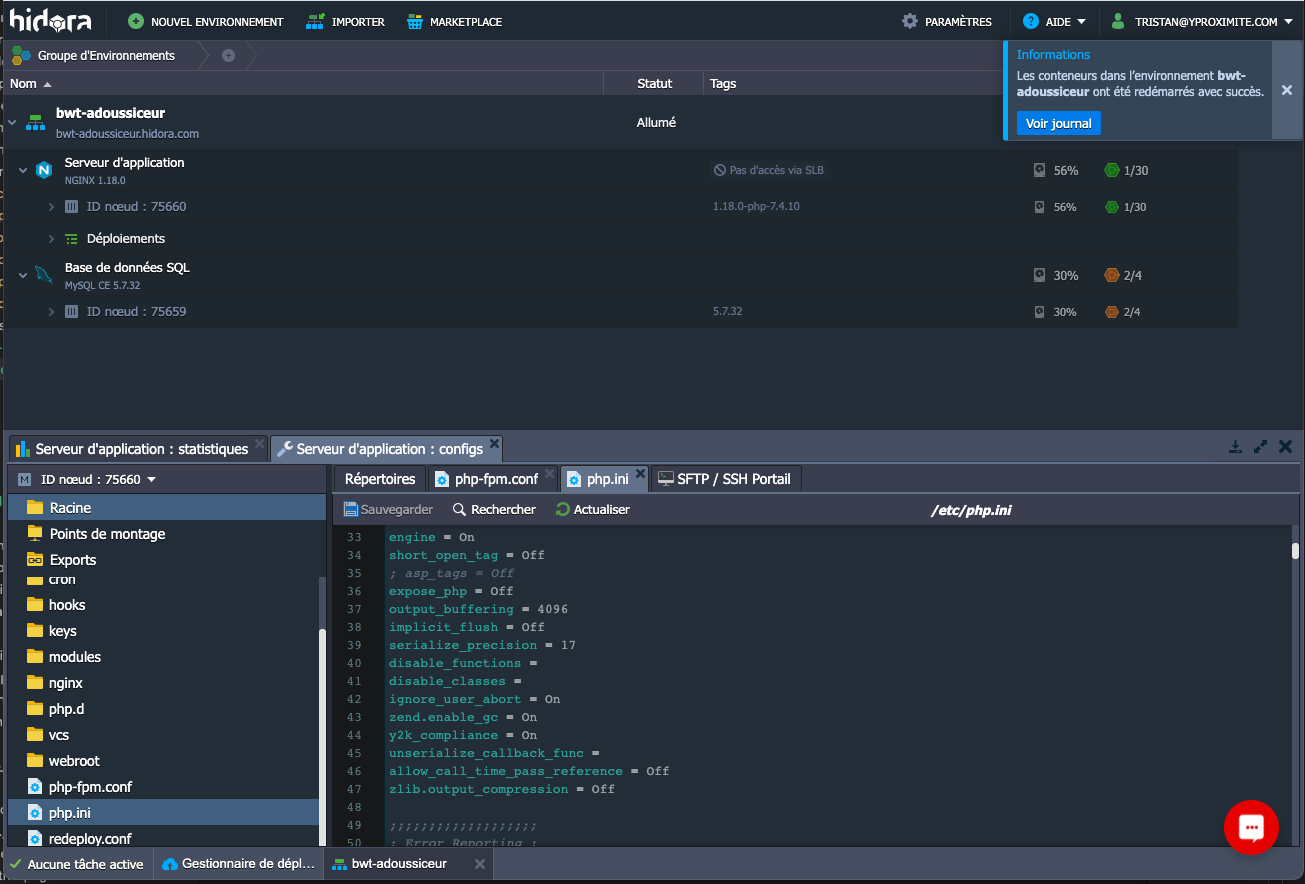
Screenshot of the admin interface:
Performance at Hidora
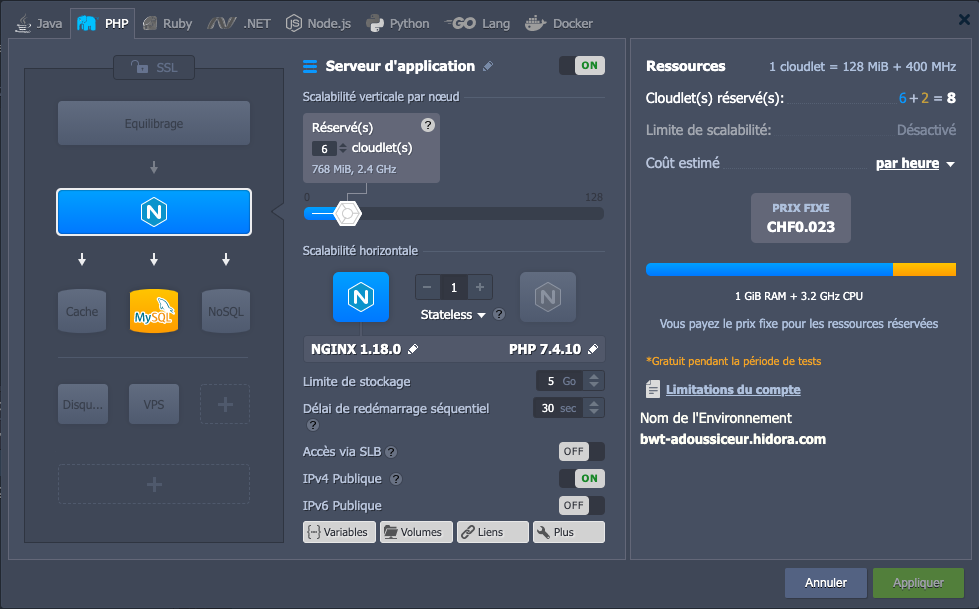
Here’s one of the infrastructure topologies running the WordPress site. The visuals make it easier to understand the setup and the resources allocated.
Example: I send 5 unique visitors per second to the home page for 2 minutes. No optimizations, except for pm.max_children set to 10.
For €10.8/month at Scalingo, I get an average response time of 492ms.
For €15.7/month at Hidora, I get an average response time of 2,048ms.
So performance isn’t good out of the box. I think better performance would be possible, but since I didn’t have to apply any other improvements on the other platforms I tested, I didn’t do it here either.
For more details, see:
Note that Hidora bills for the resources you actually consume. We can reserve 2GHz of CPU and 2GB of RAM, and allow consumption of up to 6GHz and 6GB of RAM. If your application sometimes uses 3.4GHz of CPU, you’re only billed for that consumption, not for the maximum you chose (6GHz), which helps keep costs under control during load spikes.
Hidora summary (TL;DR)
👎 Cons
- Interface based on Jelastic: it’s complex and not very sexy.
- The Jelastic interface could have been more UX-oriented.
- The flexibility can lead to bad practices (= editing config files by hand on the servers)
- Not really a 100% “PaaS”: you end up installing things manually over
SSHwithapt - The application is built on the same machine that runs the code. I had to increase the platform’s available RAM just for the build, even though the run didn’t really need it.
- No easy (1-click) way to offload the application build to a separate, bigger scaler so you only pay for that scaler while you actually need it.
- Weak out-of-the-box performance (without any optimization work)
- Support doesn’t offer a “live chat” channel
👍 Pros
- Interface based on Jelastic: in-house resources go to something other than building the UI.
- Very flexible (
root,sFTP,sshaccess). That’s great if you have lots of integrations that other PaaS providers don’t support. - Lots of supported technologies, including Docker
- Support took the time to work through some of our issues over video call, with screen sharing.
- The data is hosted in Switzerland.
- With flexible resources, you’re billed for what you actually consume.
Verdict
I’m not sure I can recommend Hidora in a scenario where a developer is in charge of configuring and deploying an application (as can be the case in small teams). The UI layer provided by Jelastic is, in my view, fairly hard to get to grips with, and the experience calls for more “infra / ops / run” skills than the other 100% PaaS hosts I’ve covered in this series.
You can end up doing a hybrid of operations: configuration through the UI, as you’d expect from a PaaS, but also, more surprisingly, editing configuration files (php.ini, vhost.conf) over sFTP or SSH, which feels like configuring a dedicated server or a VPS.
For customers discovering the Jelastic interface that Hidora uses, a screen-sharing session with support is a must to make sense of it all.
⚠️ My opinion of this host only covers the way I used it. Honestly, I’m not sure my use case gets the most out of this host ⚠️