This post, clickbait title and all, is part of a series explaining how I managed to cut our Symfony2 application’s response time by a factor of 2 without changing anything in the application itself.
In this series:
- Part 1. MySQL vs MariaDB
- Part 2. Apache2 vs Nginx
- Part 3. The impact of the migration on performance
Apache vs Nginx (PHP5-FPM)
The application was running on Apache 2.2 + PHP 5.4.6 + APC. I decided to move it to nginx 1.6 + php-fpm 5.5.15 + APCu + OPCache.
The hardware
Before:
| Component | Spec |
|---|---|
| CPU | Intel Xeon L3426 4c/8t @ 1.8GHz |
| RAM | 16 GB |
| Hard Drive | 2x1.8TB @ 7200rpm |
| Network | 400Mbps |
After:
| Component | Spec |
|---|---|
| CPU | Intel Xeon E5-1620v2 4c/8t @ 3.8GHz |
| RAM | 32 GB DDR3 ECC 1600MHz |
| Hard Drive | 3x 160GB SSD Intel DCS3500 SATA3 6Gbps (Raid 1) |
| Network | 1 Gbps Public network + 1 Gbps Private network |
Tuning nginx 1.6.x
The nginx configuration:
daemon on;
user www-data;
worker_processes 10;
pid /var/run/nginx.pid;
worker_rlimit_nofile 20000;

events {
    worker_connections 4096;
    multi_accept on;
    use epoll;
}

http {
    sendfile on;
    tcp_nopush on;
    tcp_nodelay on;
    keepalive_timeout 15;
    types_hash_max_size 2048;
    server_tokens off;

    client_max_body_size 400m;
    client_body_buffer_size 128k;

    send_timeout 4;

    include /etc/nginx/mime.types;
    default_type application/octet-stream;

    log_format main '$remote_addr - $remote_user [$time_local] "$request" '
                    '$status $body_bytes_sent "$http_referer" '
                    '"$http_user_agent" "$http_x_forwarded_for"';

    access_log /var/log/nginx/access.log main buffer=16k;
    error_log /var/log/nginx/error.log;

    open_file_cache          max=5000  inactive=20s;
    open_file_cache_valid    30s;
    open_file_cache_min_uses 2;
    open_file_cache_errors   on;

    gzip on;
    gzip_disable "msie6";
    gzip_vary on;
    gzip_proxied any;
    gzip_comp_level 6;
    gzip_buffers 16 8k;
    gzip_http_version 1.1;
    gzip_types text/plain text/css application/json application/x-javascript text/xml application/xml application/xml+rss text/javascript;

    include /etc/nginx/conf.d/*.conf;
    include /etc/nginx/sites-enabled/*;
}
The vhost configuration:
server {
    listen 8080 default_server;
    root /path/to/current/web;

    location / {
        try_files $uri @rewriteapp;
    }

    location @rewriteapp {
        rewrite ^(.*)$ /site.php/$1 last;
    }

    location ~ ^/(site|site_dev|admin|admin_dev)\.php(/|$) {
        fastcgi_pass unix:/var/run/php5-fpm.sock;
        fastcgi_split_path_info ^(.+\.php)(/.*)$;
        include fastcgi_params;
        fastcgi_param SCRIPT_FILENAME $document_root$fastcgi_script_name;
        fastcgi_param HTTPS off;
        fastcgi_buffer_size 128k;
        fastcgi_buffers 256 16k;
        fastcgi_busy_buffers_size 256k;
        fastcgi_temp_file_write_size 256k;
        fastcgi_read_timeout 240;
        fastcgi_max_temp_file_size 0;
    }

    location ~* \.(jpg|jpeg|png|gif|ico)$ {
        log_not_found off;
        access_log off;
    }

    access_log /var/log/nginx/yproximite_access.log main buffer=16k;
    error_log /var/log/nginx/yproximite_error.log;
}
The php-fpm configuration:
pm_type: dynamic
pm_max_children: 300
pm_start_servers: 5
pm_min_spare_servers: 5
pm_max_spare_servers: 35
pm_process_idle_timeout: 10s
pm_max_requests: 500
Other tweaks:
- Raised the limit on simultaneously open files (
ulimit) - Raised the kernel’s maximum number of connections allowed per socket (
net.core.somaxconn)
Performance before the migration
Our Symfony2 application is fairly resource-hungry to begin with, especially given the number of sub-requests it fires off to render content blocks.
For the first load test I got a little greedy: I had loader.io hammer the application continuously for 60 seconds, ramping from 50 up to 100 concurrent users. The verdict came down like a guillotine:
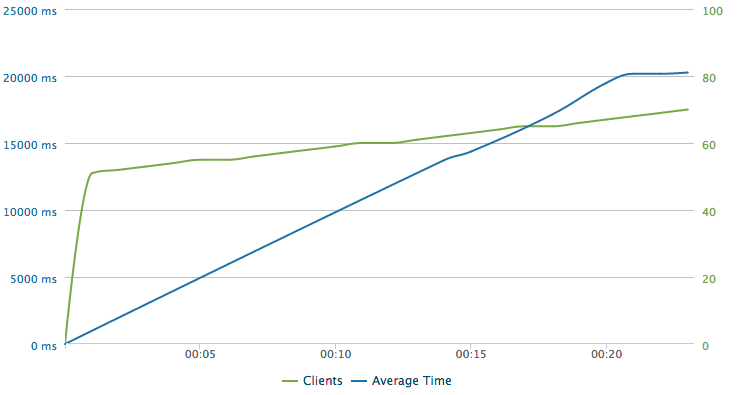
- 50% errors (HTTP status != 200), where the server sent back nothing at all
- 17.2 seconds average response time
- The test stopped at 70 users / second
So I decided to scale my demands way back, to a gradual ramp of 25 users/second:
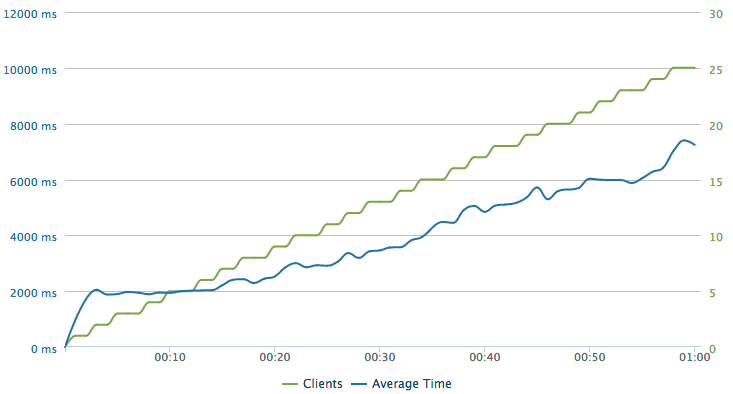
- 0% errors (HTTP status != 200)
- 4.2 seconds average response time
Performance after the migration
Then, with my load-balanced pool of 2 servers, I ran the same scenarios again.
Up to 100 users per second, sustained:
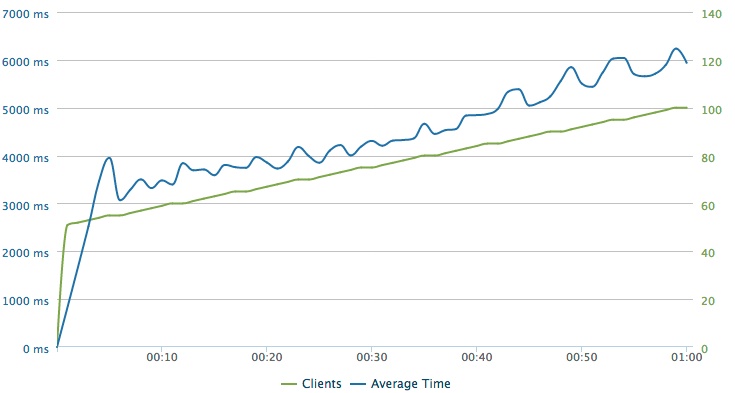
- 0% errors (HTTP status != 200)
- 3.6 seconds average response time
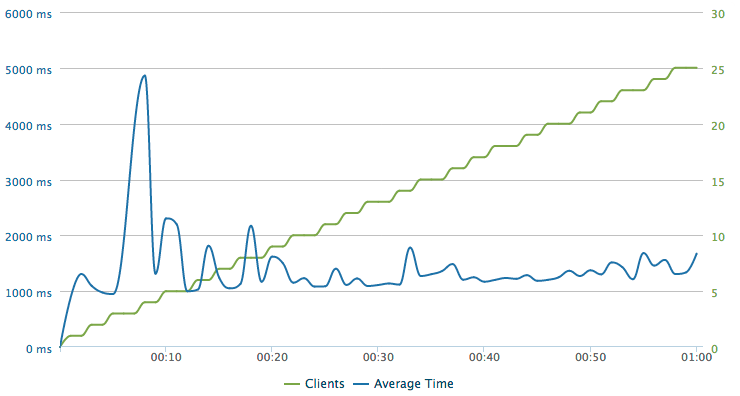
Up to 25 users per second, sustained:
- 0% errors (HTTP status != 200)
- 1.3 seconds average response time
PHP 5.5 and memory management
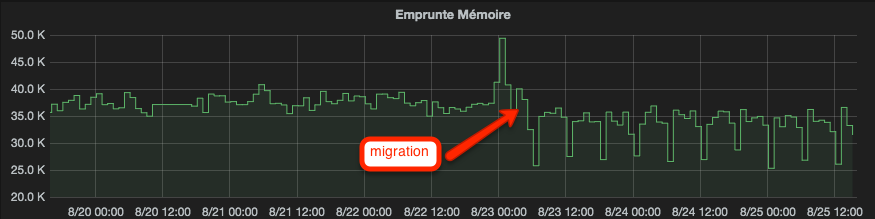
The big new feature in PHP 5.4 was improved memory management, and plenty of you published interesting benchmarks showing how much memory it saved. So here is a comparison of memory usage between PHP 5.4 and PHP 5.5. As you can see, memory usage improves slightly.
The result
Side note: I was surprised to see how CPU-bound PHP is. When I noticed that every CPU was pegged at 100% during the load test while PHP’s memory usage barely reached 3GB out of the 32GB available, I even started wondering whether I had forgotten something…
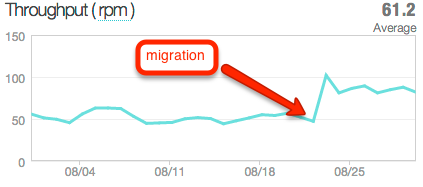
Here is the impact of the performance gain on requests per minute, in real-world use of the application.
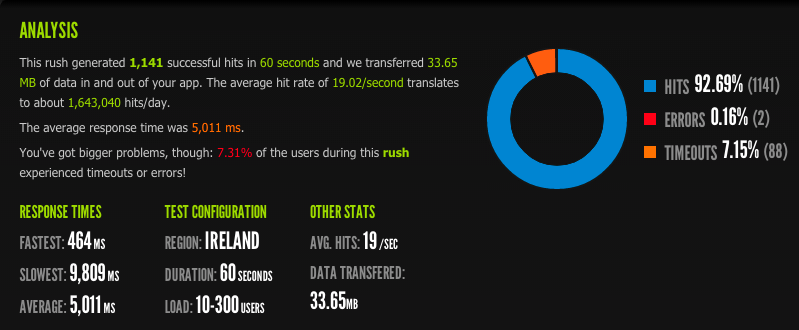
And as a bonus, a little scenario going up to 300 users. A 5-second average response time obviously isn’t acceptable for a web application, but in a few months Varnish will come along and blow these numbers out of the water.
I’ll present the application’s overall performance after the migration in the next post (gotta keep the suspense going…).