This post, clickbait title and all, is part of a series explaining how I managed to cut our Symfony2 application’s response time by a factor of 2 without changing anything in the application itself.
In this series:
- Part 1. MySQL vs MariaDB
- Part 2. Apache2 vs Nginx
- Part 3. The impact of the migration on performance
MySQL vs MariaDB
The Symfony2 application was running on MySQL 5.1 with the InnoDB engine. MariaDB was the obvious choice, given its reputation for performance (I can already hear the PostgreSQL fans grumbling in the distance) and the fact that Google and Wikipedia have said goodbye to MySQL.
For the record, MariaDB was designed as a “drop-in replacement” for MySQL. The binaries even have the same names. The MySQL -> MariaDB switch went through without a single incident. I use XtraDB, the drop-in replacement for InnoDB, which is also patched and optimized every which way.
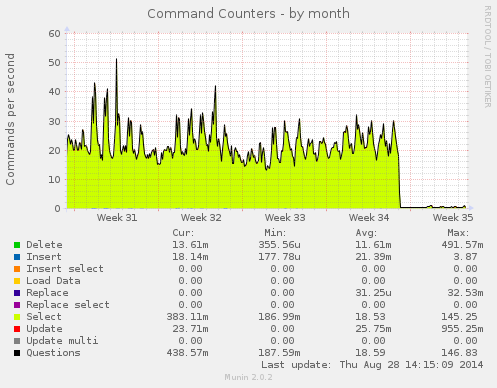
For reference, here is what we were getting with the old MySQL server:
The hardware
Before (Online.net):
| Component | Spec |
|---|---|
| CPU | Intel Xeon 4c/8t L3426 @ 1.8GHz |
| RAM | 16 GB |
| Hard Drive | 2x1.8TB @ 7200rpm |
| Network | 400Mbps |
After (Ovh.com):
| Component | Spec |
|---|---|
| CPU | Intel Xeon E5-1620v2 4c/8t @ 3.8GHz |
| RAM | 32 GB DDR3 ECC 1600MHz |
| Hard Drive | 3x 160GB SSD Intel DCS3500 SATA3 6Gbps (RAID 1) |
| Network | 1 Gbps Public network + 1 Gbps Private network |
Tuning MariaDB 10.0.x
The web and database servers talk to each other over the vRack, through a second network card, on a private network (cut off from the internet). This keeps needless calls from flooding the public network card and, down the road, will let us isolate the database servers from the public network (NSA…).
OVH, with its many warnings, seems to discourage this practice, even though it’s the vRack’s big selling point.
That little digression aside, this post isn’t meant to explain what all these optimizations do; I found them here and there.
[mysqld]
character-set-server=latin1
innodb_file_per_table=1
max_allowed_packet=64M
skip-external-locking
max-connect-errors=100000
max-connections=1000

# InnoDB settings
innodb_buffer_pool_size=15G
innodb_log_file_size=2G
innodb_io_capacity=2000

# Should be disabled on SSD
innodb_flush_neighbors=0

# Total IOPS capacity of your drive
innodb_io_capacity_max=6000
innodb_lru_scan_depth=2000

# Binary log/replication
log-bin = /var/log/mysql/mysql-bin.log
binlog-format=row
binlog_do_db=yprox
log-basename=master
server_id=1
expire_logs_days=15
transaction-isolation=READ-COMMITTED
innodb_autoinc_lock_mode=2
To find the max IOPS (Input/Output Operations Per Second), check your SSD’s spec sheet from the manufacturer: it should be listed there. (Do knock 10-15% off the figures manufacturers advertise, though.) If you’re running spinning disks in RAID, there are ways to work it out available here.
Cleaning up the log tables
The application has log tables that record every change made in the application. I purged them, and the database went from 7GB down to 2GB.
Running mysql_tuner turned up some fragmented tables. A quick mysqlcheck -o, which runs a CHECK TABLE, a REPAIR TABLE, an ANALYZE TABLE and finally an OPTIMIZE TABLE in turn, took care of it.
Load testing
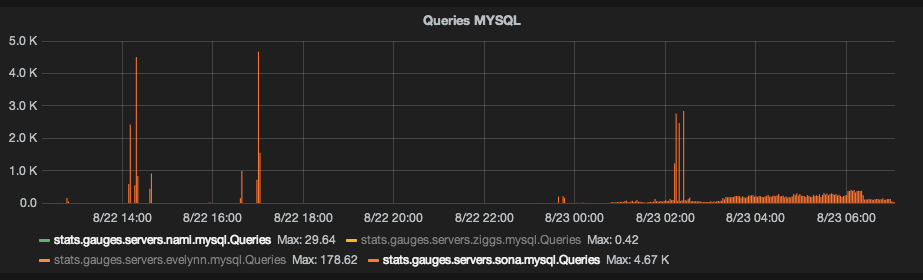
When I pushed the application to 300 requests per second, MariaDB climbed to 450 queries per second (4500/10 seconds on the graph below). I got a few errors saying there were no MySQL connection slots left, which led me to go from max-connections=500 to max-connections=1000.
As is often the case with PHP, you hit PHP’s limits well before the database’s. I don’t seem to have reached MariaDB’s maximum capacity.
The result
Here is what we got before/after the migration; the last activity spike is the database export.
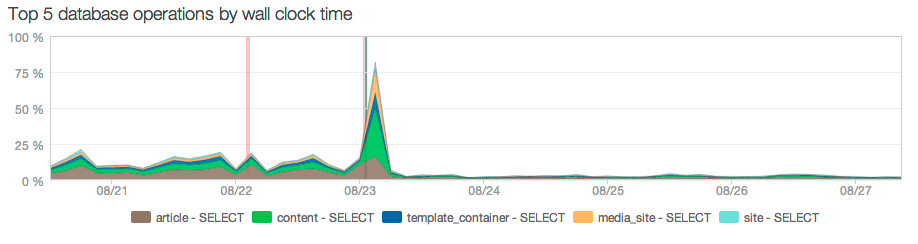
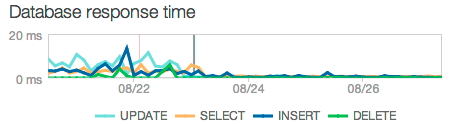
Database response time improved dramatically: from 7ms down to 0.3ms, a 23x speedup.